
Table Setting
QR Table Cards: Let Your Guests Share Memories Without Leaving the Table
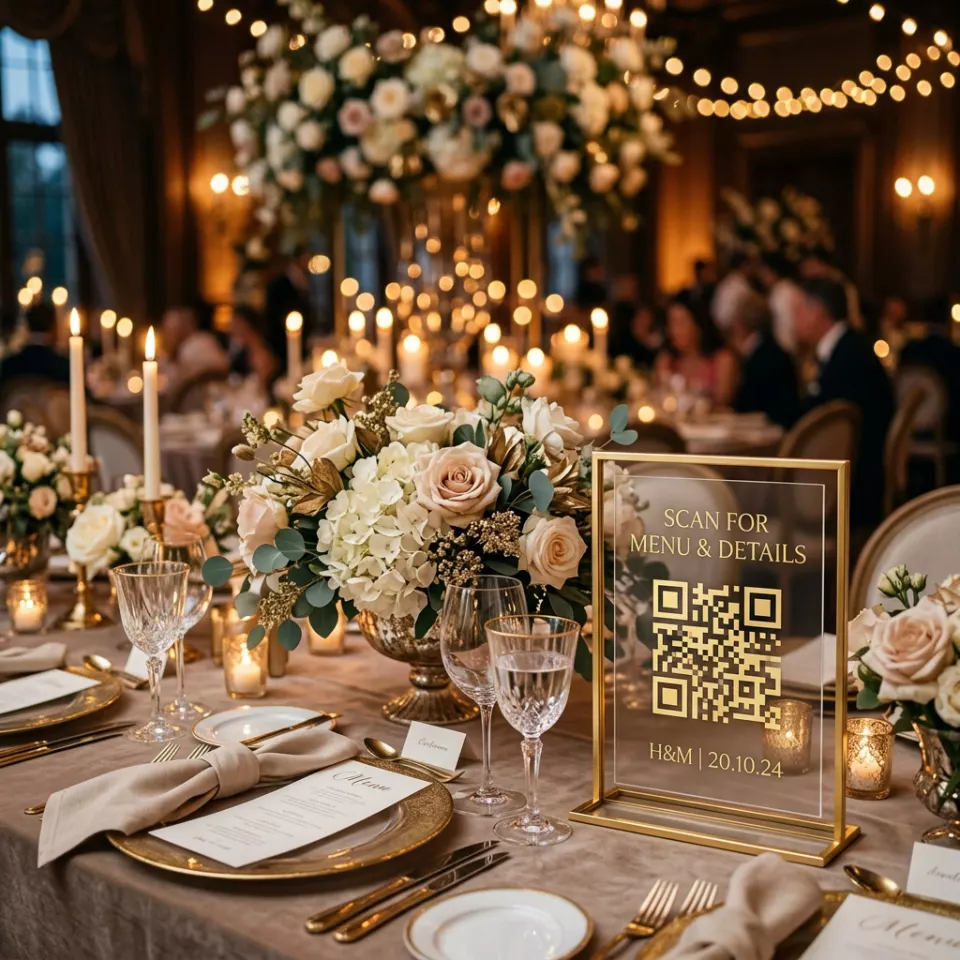
A QR table card is a small card on every table that takes guests to the photo upload page with a single scan. A card printed at the right size, placed in the right spot and supported by a sentence explaining what it does, is what brings the night's photos together in one place.
Prepared by: UQR Event Team Last updated:
What is a QR table card for?
A table card already exists at every wedding: it shows the table number or the name given to the table. When a QR code is added to it, the card takes on a second role and sends guests to your event's photo sharing page.
The guest scans the code and uploads the photos and videos from their phone without installing an app. We describe the whole system in detail on the QR code photo sharing page.
Paper table card or acrylic QR stand?
Both work; the choice depends on your venue, your table setting and your budget.
| Feature | Paper table card | Acrylic QR stand |
|---|---|---|
| Visibility | Sits low, can hide behind the arrangement | Stands upright, noticed from afar |
| Durability | Can get wet if a drink is spilled | Wiped clean, does not get wet |
| Design match | Matches the invitation paper and colours exactly | Transparent shape fits any decor |
| Reuse | Single use | Can be reused at other events |
At weddings with long, crowded tables an acrylic stand usually works best; on round tables with few people, a paper card printed in the same design as the invitation is often enough.
What should be written on the table card? Wording examples
Leaving the code alone is the most common mistake. If a guest does not know what the code is for, they may mistake it for a menu or the Wi-Fi password and move on. A short, warm sentence that says what to do is enough:
Tonight, you are the photographer. Scan the code and share your photos with us.
You captured the moments we could not see. Upload your photos and videos here.
Would you like to leave a note? Scan the code to add your photo and good wishes to our guest book.
If the venue offers guest Wi-Fi, add the network name and password to the bottom of the card in small letters. Because uploading needs the internet, this little note makes a big difference in rooms with weak reception.
Size, placement and readability for a QR table card
QR code size: 3–4 cm
A table card is scanned by a seated guest from a distance of 40–60 cm. For this distance the 2 cm used on invitations is not enough; make the code at least 3 cm, preferably 4 cm.
Prefer a matte surface
Room lighting and candles reflect on gloss lamination and make the code hard to scan. On paper cards, matte Cellophane or thick uncoated paper is safer.
How many cards per table?
On round tables a single stand in the middle is usually enough; printing the code on both sides of the card lets it be scanned from either side of the table. On long tables, placing a card every 6–8 people makes it easy for guests to reach the code without getting up.
Put it in front of the arrangement
After the flowers and candles are set up, check that the card is not hidden at the back. It should be visible from the eye level of a seated guest.
Use the same QR code on the invitation, board and tables
Your event has a single QR code. You can print it on your QR code invitation, on the welcome board at the entrance and on the table cards. Whichever one a guest scans, they reach the same event page and the photos join in a single gallery.
A guest who scans the invitation sees your e-invitation page before the event. In this way the code becomes a familiar path on your guests' phones long before the wedding day.
Steps for creating a QR table card
-
Download your QR code
Download your event's QR code from the admin panel as SVG for printing and PNG for digital design.
-
Place it in the card design
Place the code at least 3 cm in size, in a dark colour on a light background with a quiet zone around it, and add your short caption next to it.
-
Get a proof print
Print one card, put it on the table, and test it from your seat with different phones and in dim light.
-
Place the cards on the tables
Place the cards after the flower arrangements are installed, so a seated guest can see them.
-
Remind guests at the start of the night
A short announcement by the host or DJ at the beginning of the night makes guests notice the code on the table.
Frequently asked questions about QR table cards
Do I need a separate QR code for every table?
No. All tables use the same QR code for your event and the photos gather in a single gallery.
How large should the QR code on a table card be?
Because a seated guest scans the card from 40–60 cm, the code should be at least 3 cm, preferably 4 cm.
Do you supply the acrylic QR stands?
We can supply acrylic QR stands depending on your package. If you prefer to print with your own design, you can download your code from the panel and give it to your printer. For details, get in touch with us.
What if guests do not scan the QR code?
Add a sentence on the card explaining what the code does and have a short announcement made at the start of the night. If you have also used the same code on the invitation, guests will already know the code.